Free
€0/ month
100 documents / month
400 pages · 200 credits, plus 400 one-time credits to migrate your first templates
Start freeDocument templates, rebuilt by AI and checked by you
Upload a Word document. Ristmark rebuilds it as a live template with the fields marked for you to check. Then fill it with new data and render it as PDF, HTML or editable DOCX, in the app or through the API.
Free plan, no credit card. For business use.
Upload a Word (.docx) or RTF file. That is the path we stand behind, because the page is rendered from the file itself. PDFs and scans work too, through visual reconstruction, with lower fidelity and a closer review.Upload a Word or RTF file for best fidelity. PDFs and scans use visual reconstruction and need a closer review.
The layout comes back editable and the changing parts become named fields. Every field carries the model’s own confidence, so the uncertain ones flag themselves and you know where to look first. It is usually right, not always.Ristmark rebuilds the layout as an editable template and flags uncertain fields so you can check them first.
Fill the template in the app, or call the keyed /v1 API for single documents and batches. PDF and HTML come out the same for the same template, data and renderer version, because no AI runs at generation. DOCX stays editable.Fill the template in the app or via the API. Generate PDF, HTML or editable DOCX.
Document templates, rebuilt by AI and checked by you
Upload a Word document. Ristmark rebuilds it as a live template with the fields marked for you to check. Then fill it with new data and render it as PDF, HTML or editable DOCX, in the app or through the API.
Free plan, no credit card. For business use.
See how it worksThe editor
Your template opens as the page it will print as. Select a block to change its style, its data and the conditions that show it. What you see on the canvas is what the PDF draws.
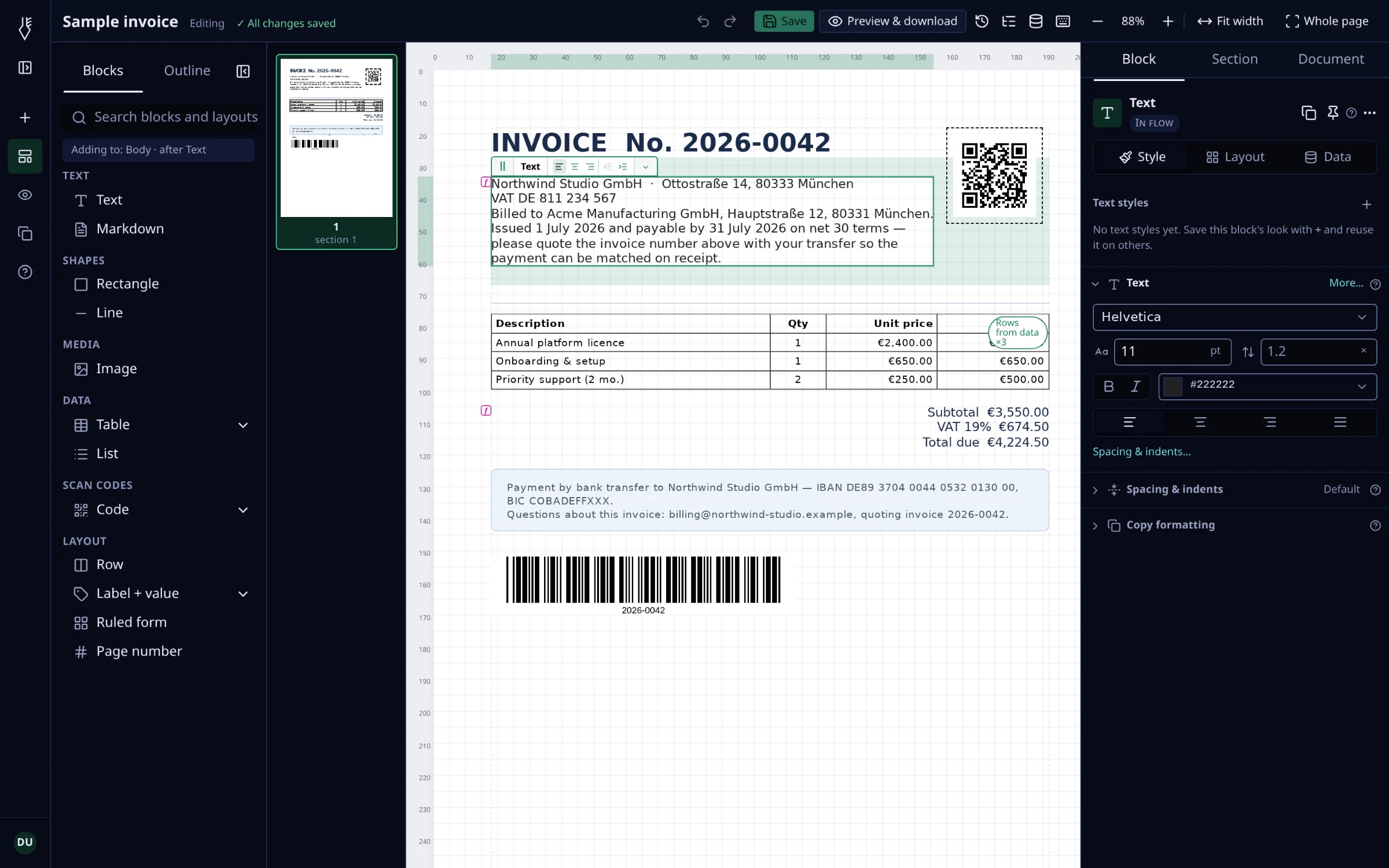
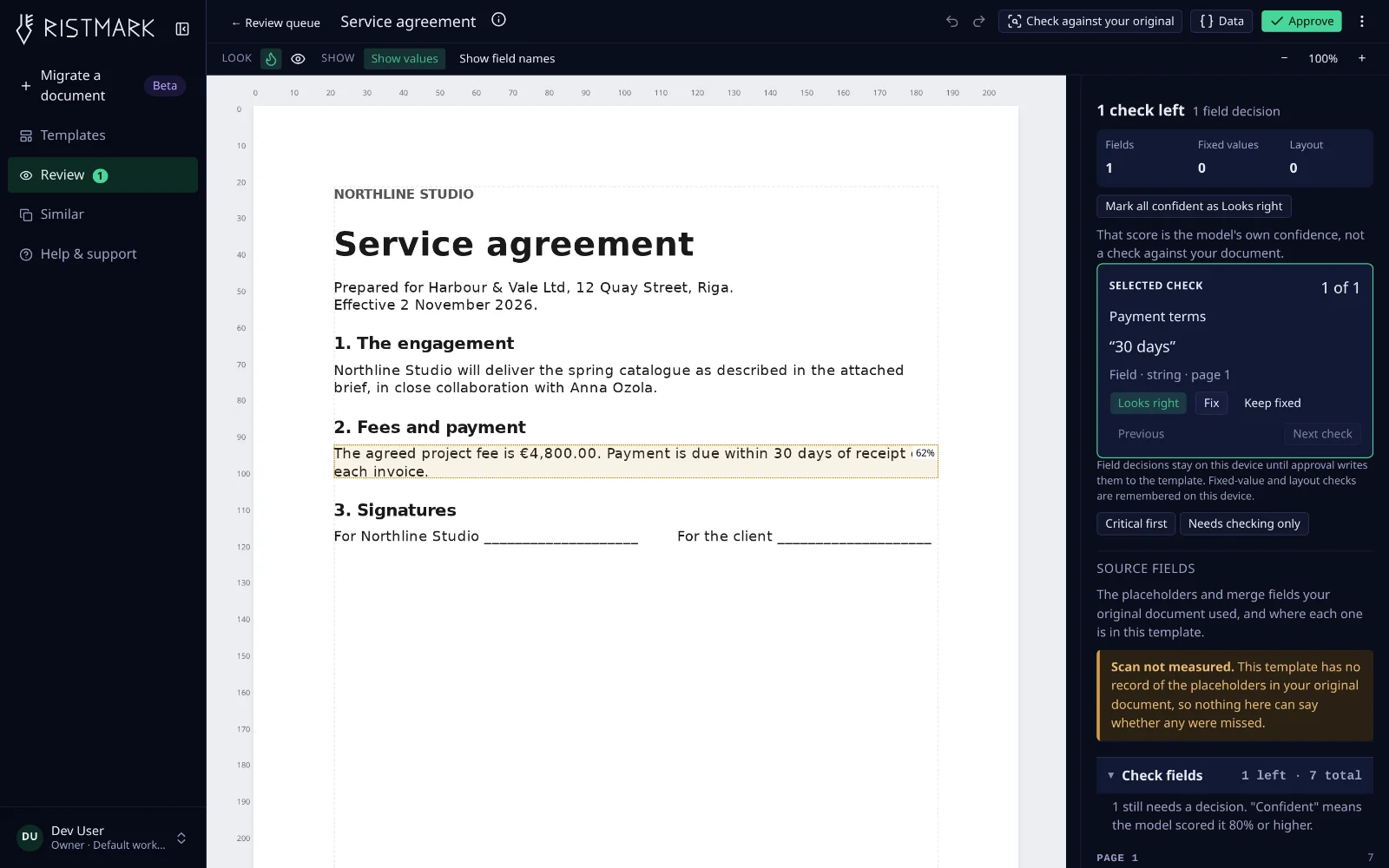
Plate I · The editorThe Ristmark editor with the sample invoice. The selected text lists the fields it reads and the value each one takes from your data.
Plate II · ReviewReview after migration. Each field shows how sure the model was; the uncertain ones are marked.
/v1 API for single documents and batches. API docs Pricing
Every plan has every feature. You choose how many documents a month. At your cap, work pauses until renewal, an upgrade or a credit pack; there are no automatic overage charges.
€0/ month
100 documents / month
400 pages · 200 credits, plus 400 one-time credits to migrate your first templates
Start free€19/ month
600 documents / month
2,400 pages · 1,200 credits
Choose Basic€29/ month
1,000 documents / month
4,000 pages · 2,000 credits
Choose Starter€79/ month
4,000 documents / month
16,000 pages · 8,000 credits
Choose Pro€199/ month
12,000 documents / month
48,000 pages · 24,000 credits
Choose ScaleMonthly prices, excluding VAT. Generation costs ½ credit per page, counted per rendered page and never rounded up per document: a one-page document costs ½ credit and a three-page one 1.5 credits. Documents assume four pages each. For business use only. Full pricing and credit packs
Good to know
Word and RTF are the primary path. PDF and scans use visual reconstruction, with lower fidelity. Only the first 7 source pages are migrated.
Every migration rebuilds the layout from a picture of the page (visual reconstruction). From Word and RTF that picture is rendered from the file itself and cross-checked against its structure. PDFs and scans give us only the picture, so fidelity is lower and they need a closer review. Only the first 7 pages of a document are migrated — a longer one is truncated there, and we tell you it happened. Ruled scanned forms aren’t good enough yet.
Merged cells, images and links survive. Letterhead backgrounds drop; every list — flat or nested — exports as plain paragraphs with its markers written into the text, so Word won’t renumber it; a table’s per-cell borders and vertical alignment collapse to table-level styling; a ruled form keeps its text but not its drawn layout — labels and values print one under another; a block we have no .docx drawing path for becomes a labelled placeholder; and an Arabic or Hebrew paragraph is laid out left to right, so punctuation at its edges lands on the wrong side. PDF is the faithful deliverable, except for right-to-left and East Asian text — see Languages and scripts in the docs.
Sign where you sign today. To generate documents from another system, call our API with your own data.
Word (.docx) and RTF — the higher-fidelity path, because the page is rendered from the file itself and cross-checked against its structure. PDF and image files also use visual reconstruction, with only the picture to go on, so review them more carefully. Only the first 7 pages of a document are migrated; a longer one is truncated there and the product says so.
The AI reports how sure it is on every field it labels. Fields it is unsure about flag themselves, so you know where to look first. It is usually right, not always: confidence can be wrong or miss a field, so check the complete template before you rely on it.
PDF and HTML generation is repeatable with the same template, data, assets and renderer version. No AI runs at generation time. DOCX output is editable and can differ in its bytes between renders. Test templates with representative data before automating them.
Yes — a keyed /v1 API generates single documents and batches. See the API docs.
Check Settings → Usage any time to see how close you are. Migration, recognition and generation all pause at the credit cap until the next monthly cycle or an upgrade — or you can buy a one-time credit pack to keep going immediately. You're never billed for usage you didn't buy.
No credit card. For business use.